Notes的關鍵字在Web上最讓人討厭的一點就是『關鍵字變更時畫面就會Refresh』,本期之智頡分享報將要提供可以解決此種困擾的方法,依序將步驟說明如下:
註:本程式會利用到微軟提供的Microsoft.XMLDOM的Object,故僅能提供IE5.5以上之瀏覽器使用,相關說明請自行參考微軟MSDN網站.(http://www.msdn.com)
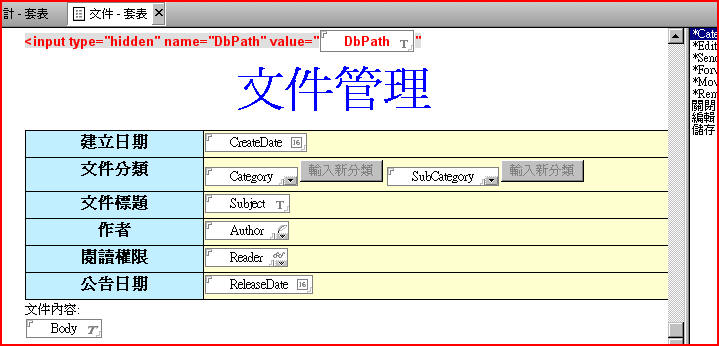
1. 在資料庫中建立一套表,該套表中分別有一個主分類(Category)與次分類(SubCategory)之欄位,請參考下圖:
2.
在此套表的最上方必須建立一個DbPath的計算欄位,該欄位之計算公式為:
"/"+@ReplaceSubstring(@Subset(@DbName;-1);"\\";"/")+"/"
在此欄位的前方必須加上<input type="hidden" name="DbPath" value="的html語法,欄位的最後方則必須加上",最後請將整行標記當成HTML文字.(請參考上圖)
3.在此套表的JSHeader中加上如下之JavaScript程式:
function changesub(){
var f=document.forms[0];
var catField = document.forms[0].SubCategory;
var source = new ActiveXObject('Microsoft.XMLDOM');
source.async = false;
source.load(f.DbPath.value+"(GetSubCategory)?OpenAgent&maincate="+f.Category.options[f.Category.selectedIndex].text);
var root = source.documentElement;
var oNodeList = root.childNodes[0].childNodes;
if (oNodeList.length!=0){
catField.length=0;
for(var i=0;i<oNodeList.length;i++){
var newOpt = new Option(oNodeList[i].text, oNodeList[i].text,
false, true);
catField.options[catField.options.length] = newOpt;
}
catField.selectedIndex=0;
}else{
catField.length=0;
}
}
4.在Category的onChange事件中,執行如下之JavaScript
Function:
changesub();
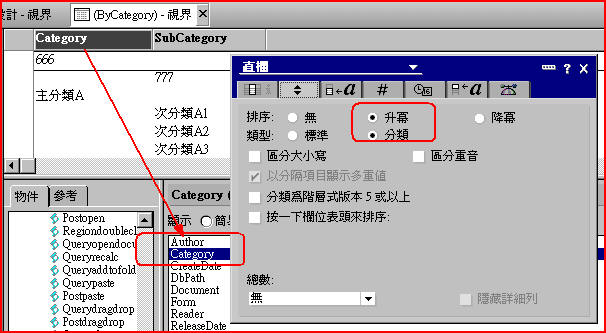
5.請在資料庫中建立一個視界,視界名稱為”(ByCategory)”,視界第一個直欄公式與排序設定如下圖:
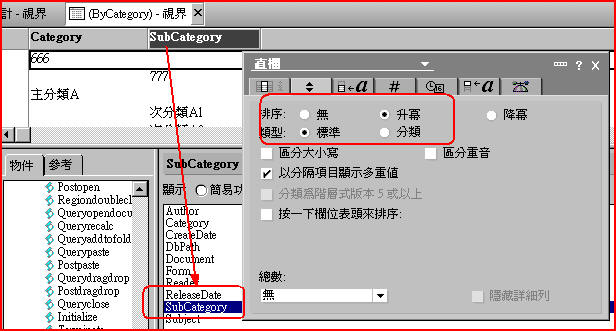
視界第二個直欄公式與排序設定如下圖:
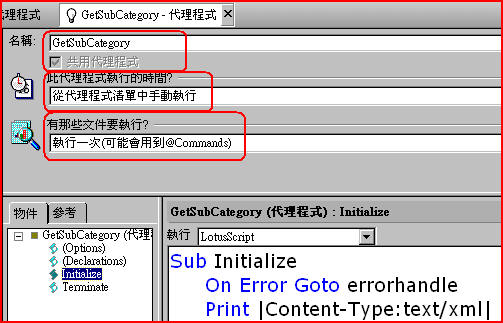
6.在資料庫中建立一代理程式,該代理程式之設定與程式內容如下:
Sub Initialize
On Error Goto errorhandle
Print |Content-Type:text/xml|
'請注意一下Notes Web
Server的語系輸出(UTF-8 or
BIG5)
Print |<?xml version="1.0"
encoding="UTF-8" ?>|
'Print {<?xml version="1.0"
encoding="BIG5"?>}
Print |<root>|+Chr$(13)
Print "<Document>"+Chr$(13)
Dim session As New NotesSession
Dim db As NotesDatabase
Dim doc As NotesDocument
Dim view As NotesView
Dim doc1 As NotesDocument
Dim sdoc As NotesDocument
Dim dc As NotesDocumentCollection
Set db=session.CurrentDatabase
Set doc=session.DocumentContext
Set view=db.GetView("(ByCategory)")
Set doc1 = view.GetFirstDocument
Dim MainCate As String
MainCate=Strright(doc.Query_String_Decoded(0),"&maincate=")
Set dc=view.GetAllDocumentsByKey(MainCate,True)
For i=1 To dc.Count
Set sdoc=dc.GetNthDocument(i)
Print "<SubCategory>"+Chr$(13)
Print sdoc.SubCategory(0)
Print "</SubCategory>"+Chr$(13)
Next
Print "</Document>"+Chr$(13)
Print "</root>"
Exit Sub
errorhandle:
Print "<Error>"+Chr$(13)
Print Error$+"(Error Line="+Cstr(Erl)+")"
Print "</Error>"+Chr$(13)
Print "</Document>"+Chr$(13)
Print "</root>"
End Sub
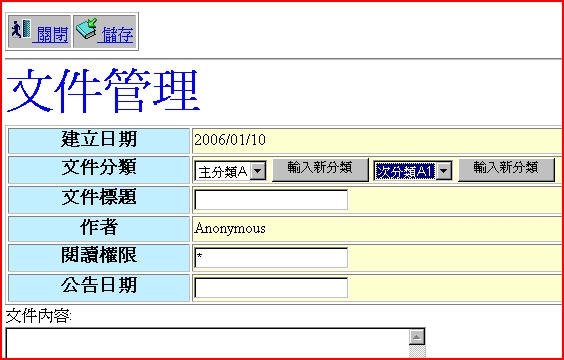
7.最後就可以直接在Web上測試囉!!當主分類改變時,次分類的選項內容也會動態跟著改變,且畫面都不用Refresh.
 【第0096期2006/1/10】
